
냥냠
Streamlit을 이용한 LangChain RAG AI Agent 웹 서비스 구축 본문
https://github.com/sueyeon00/rag-chatbot-streamlit.githttps://github.com/sueyeon00/rag-chatbot-streamlit.githttps://github.com/sueyeon00/rag-chatbot-streamlit.git
LangChain과 RAG(Retrieval-Augmented Generation) 기술을 활용하여 다중 문서 처리가 가능한 지능형 챗봇 에이전트를 구현하였다. Streamlit 프레임워크를 기반으로 UI를 구현했고, 사용자가 PDF 및 텍스트 파일을 업로드하고 실시간으로 문서 내용에 대해 질의응답할 수 있는 시스템을 구축했다.

1. 파일 로드( .pdf)
RAG 구축에서 가장 첫 번째 단계로 pdf 파일 등 문서를 로드한다.
2. 문서 분할
로드한 파일을 작은 청크 단위로 나누어 검색할 때 효율적으로 사용할 수 있게 한다. -> 청크 단위를 선택할 수 있게끔
3. 저장 단계 (벡터 스토어 : FAISS)
나눈 청크 단위를 데이터베이스, 벡터 스토어에 저장하는 단계이며 나중에 리트리버가 여기서 검색할 수 있다.
4. 정보 검색 (리트리버)
사용자가 입력한 질문에 맞는 정보를 벡터스토어에서 찾아낸다. 여기서 Reranker 기능을 넣어주어 성능을 높일 수 있다.
5. 프롬프트 작성 후 답변
여기서 문서 안에서 찾을 수 없다면 모른다고 답하라고 하여 할루시네이션을 줄이고 출처가 명확한 답변만 얻을 수 있게 한다.
🎯 주요 기능
- 프로젝트 관리 : 새로운 프로젝트를 만들고 그에 맞는 문서들을 따로 관리하여 답변을 받을 수 있게 하였다.
- 향상된 검색 기능 옵션 : 조금 더 성능을 개선할 수 있는 몇 가지의 방법들을 쉽게 설정할 수 있도록 하였다.
(모델 선택, reranker 선택, 청크 단위 선택)
🚀 워크플로우
1. 프로젝트 생성 -> 2. 문서 업로드 -> 3. 벡터화 -> 4. 채팅 시작 -> 5. 검색 수행 -> (6. Reranking -> 7. 문서 압축) -> 8. 답변 생성
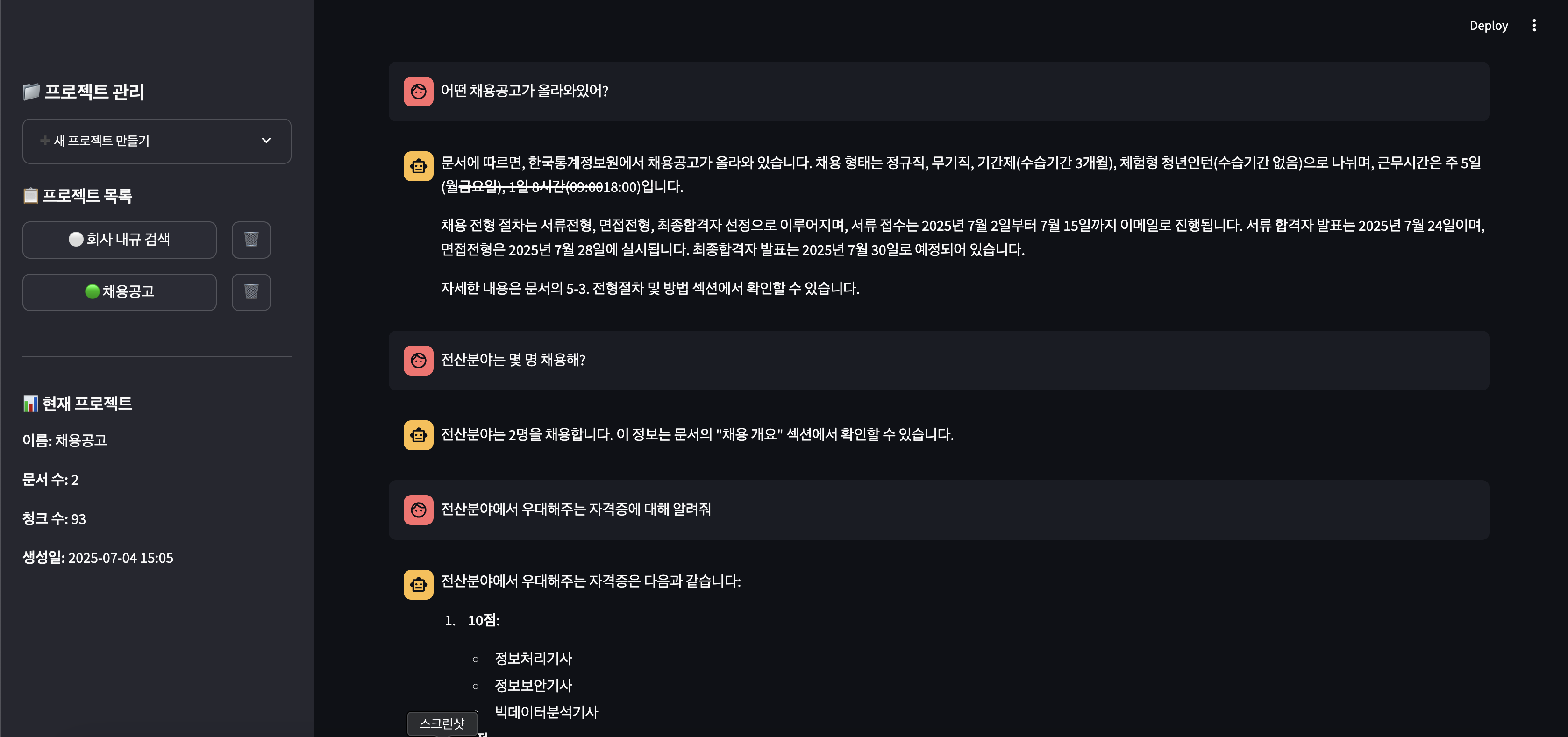
💡 화면 설명
📤 문서 업로드 구역 : 여러 문서를 업로드할 수 있게 하였으며 성능개선을 위한 옵션이 있다.
💬 채팅 구역 : 업로드된 문서를 기반으로 실시간 질의응답을 할 수 있다.
📊 프로젝트 상세 구역 : 업로드된 문서를 확인할 수 있고 채팅 수, 청크 수 등의 정보를 알 수 있다.


🛠️ 기술 스택
- Frontend: Streamlit
- LLM: OpenAI GPT (gpt-4o-mini, gpt-4o, gpt-3.5-turbo)
- Vector Store: FAISS
- Embeddings: OpenAI Embeddings
- Reranker: BGE (BAAI/bge-reranker-base)
- Document Processing: PyPDF2, LangChain loaders
- Text Splitting: RecursiveCharacterTextSplitter
간단한 ai agent 이기때문에 app.py 안에 모든 기능을 넣어 구현하였다.
app.py : Streamlit 으로 UI를 구성하고 기존 실습 파일의 파이썬 코드를 이용하여 RAG기능의 chain을 구성하였다.
app.py 코드 설명
🔧 핵심 기술 스택
# 주요 라이브러리
from langchain_openai import ChatOpenAI, OpenAIEmbeddings
from langchain_community.vectorstores import FAISS
from langchain.text_splitter import RecursiveCharacterTextSplitter
from sentence_transformers import CrossEncoder  # Reranker
import streamlit as st
import PyPDF2
📂 프로젝트 관리 시스템
# 세션 상태 기반 프로젝트 관리
if "projects" not in st.session_state:
    st.session_state.projects = {}
if "current_project" not in st.session_state:
    st.session_state.current_project = None
if "chat_history" not in st.session_state:
    st.session_state.chat_history = {}

def create_new_project(name, description=""):
    """새 프로젝트 생성 및 초기화"""
    project_id = str(uuid.uuid4())[:8]
    project = {
        "id": project_id,
        "name": name,
        "vector_store": None,
        "documents": [],
        "total_chunks": 0,
        "processed_documents": []
    }
    st.session_state.projects[project_id] = project
    return project_id
📄 문서 처리 파이프라인
def process_pdf_file(file_content, file_name):
    """PDF 다중 처리 방식 (PyPDF2 → LangChain 백업)"""
    try:
        # 1차: PyPDF2로 페이지별 텍스트 추출
        pdf_reader = PyPDF2.PdfReader(io.BytesIO(file_content))
        documents = []
        for page_num, page in enumerate(pdf_reader.pages):
            text = page.extract_text()
            if text.strip():
                doc = Document(
                    page_content=text,
                    metadata={"page": page_num + 1, "source": file_name}
                )
                documents.append(doc)
        return documents
    except Exception:
        # 2차: LangChain PyPDFLoader로 백업 처리
        loader = PyPDFLoader(tmp_path)
        return loader.load()

def process_text_file(file_content, file_name):
    """텍스트 파일 인코딩 자동 감지 (UTF-8 → CP949 → Latin-1)"""
    for encoding in ['utf-8', 'cp949', 'latin-1']:
        try:
            text = file_content.decode(encoding)
            return [Document(page_content=text, metadata={"source": file_name})]
        except UnicodeDecodeError:
            continue
🔍 벡터 저장소 구축
def create_vector_store(documents, project_id, chunk_size=500, chunk_overlap=50):
    """문서 분할 → 임베딩 → FAISS 벡터 저장소 생성"""
    # 1. 문서 분할
    splitter = RecursiveCharacterTextSplitter(
        chunk_size=chunk_size,
        chunk_overlap=chunk_overlap,
        separators=["\n\n", "\n", ". ", ".", " ", ""]
    )
    split_docs = splitter.split_documents(documents)

    # 2. 임베딩 생성 및 벡터 저장소 구축
    embeddings = OpenAIEmbeddings()
    vector_store = FAISS.from_documents(embedding=embeddings, documents=split_docs)

    return vector_store, len(split_docs)
🚀 고급 검색 기능
# 1. Reranker 기능
@st.cache_resource
def load_reranker():
    """BGE reranker 모델 로드 (캐시됨)"""
    return CrossEncoder("BAAI/bge-reranker-base")

def rerank_docs(query, docs, model, top_n=5):
    """검색된 문서들을 관련성 점수로 재순위 조정"""
    pairs = [[query, doc.page_content] for doc in docs]
    scores = model.predict(pairs)
    reranked = sorted(zip(scores, docs), key=lambda x: x[0], reverse=True)
    return [doc for score, doc in reranked[:top_n]]

# 2. 문서 압축 기능
if use_compression:
    compressor = LLMChainExtractor.from_llm(llm)
    retriever = ContextualCompressionRetriever(
        base_retriever=base_retriever,
        base_compressor=compressor
    )
💬 RAG 체인 구성
# 프롬프트 템플릿 설정
prompt = ChatPromptTemplate([
    ("system",
     "문서: {context}\n\n"
     "당신은 업로드된 문서들의 전문가입니다. "
     "항상 문서 내용을 기반으로 정확하고 도움이 되는 답변을 제공하세요.\n"
     "문서에서 답변을 찾을 수 없는 경우 '문서에서 관련 정보를 찾을 수 없습니다'라고 답변하세요."),
    ("user", "{query}")
])

# 향상된 검색 함수
def enhanced_retrieval(query):
    docs = retriever.invoke(query)
    if reranker_model and docs:
        docs = rerank_docs(query, docs, reranker_model, top_n=10)
    return format_docs(docs)  # 출처 정보 포함 포맷팅

# RAG 체인 생성
chain = {
    "context": RunnableLambda(enhanced_retrieval),
    "query": RunnablePassthrough()
} | prompt | llm
🎯 핵심 설계 특징
1. 다중 백업 처리
- PDF: PyPDF2 실패 시 LangChain PyPDFLoader 사용
- 텍스트: 3단계 인코딩 감지 (UTF-8 → CP949 → Latin-1)
2. 사용자 맞춤 설정
- 청크 크기/오버랩 조정 가능
- 모델 선택 (GPT-4o, GPT-4o-mini, GPT-3.5-turbo)
- 창의성(Temperature) 조절
3. 성능 최적화 옵션
- Reranker: BGE 모델로 검색 결과 재순위 조정
- 문서 압축: LLM 기반 핵심 내용 추출
- 캐싱: Streamlit cache_resource로 모델 로드 최적화
4. 할루시네이션 방지
- 문서 기반 답변 강제
- 출처 정보 필수 포함
- "모르겠다"고 답하도록 명시적 지시
5. 사용자 경험
- 프로젝트별 문서 관리
- 실시간 처리 상태 표시
- 채팅 기록 유지 및 초기화
- 디버깅 정보 제공 (검색된 문서 미리보기)
https://github.com/sueyeon00/rag-chatbot-streamlit.git
GitHub - sueyeon00/rag-chatbot-streamlit
Contribute to sueyeon00/rag-chatbot-streamlit development by creating an account on GitHub.
github.com
참고
'AI' 카테고리의 다른 글
| n8n(엔팔엔, 엔에잇엔, 네이튼, ,,.,.)으로 간단한 워크플로우 만들기 (0) | 2025.12.12 |
|---|---|
| [교육] LangChain & LangGraph 실습 - AI agent 만들기 - (3) (0) | 2025.07.01 |
| [교육] LangChain & LangGraph 실습 - AI agent 만들기 - (2) (3) | 2025.06.28 |
| [교육] LangChain & LangGraph 실습 - AI agent 만들기 - (1) (0) | 2025.06.28 |
| 2025 AI 컨퍼런스 참석 후기 ( AI Work Summit, SOTEC, AI EXPO ... ) (3) | 2025.06.17 |


